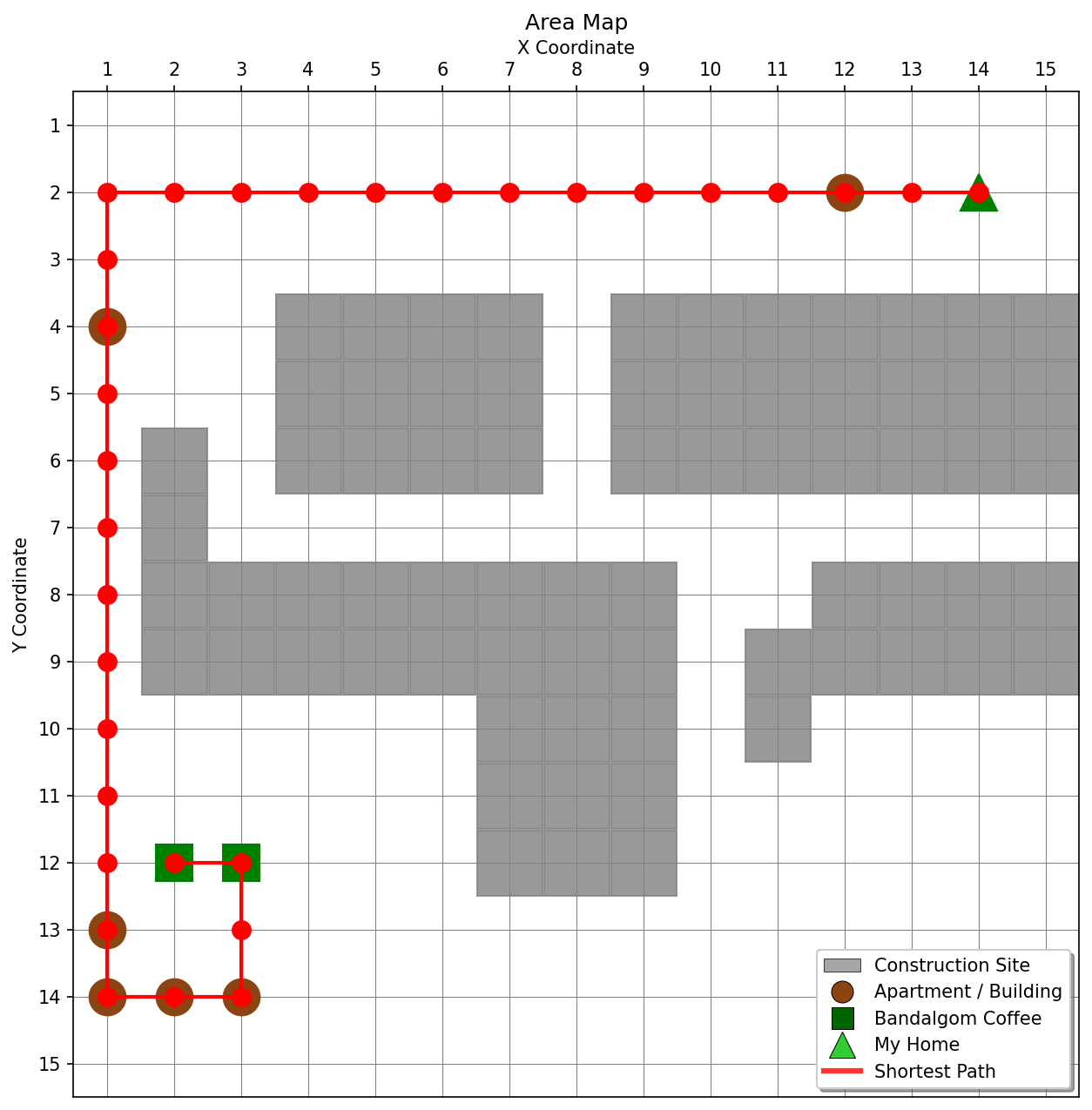
코드 전체 내용 정리
이 파이썬 스크립트는 merged.csv 파일로부터 맵 데이터를 읽어와, 장애물을 피하면서 특정 구조물들을 모두 방문하는 최단 경로를 찾는 복합적인 경로 탐색 프로그램입니다.
주요 기능은 다음과 같습니다:
- 데이터 로드 및 전처리 (load_and_process_data 함수):
- merged.csv 파일을 불러와 Pandas DataFrame으로 만듭니다.
- 'struct' 컬럼의 문자열 공백을 제거하고, 빈 값을 'Empty'로 채웁니다.
- 각 맵 셀의 최종 유형(예: 'ConstructionSite', 'Apartment', 'MyHome')을 결정하는 final_type 컬럼을 추가합니다. 건설 현장이 다른 구조물보다 우선순위를 가집니다.
- 지도 시각화 (draw_map 함수):
- 주어진 DataFrame을 기반으로 맵을 Matplotlib으로 시각화합니다.
- 그리드 라인, X/Y 축 설정, 맵 제목 등을 정의합니다.
- 각 구조물 유형(아파트, 빌딩, 반달곰 커피, 내 집, 건설 현장)을 다른 마커와 색상으로 표시합니다.
- 찾아진 경로가 있다면 빨간색 선으로 맵 위에 그립니다.
- 사용자 정의 범례를 포함하며, map_final_bonus.png 파일로 이미지를 저장하고 화면에 표시합니다.
- 경로 탐색 알고리즘 (_heuristic, _a_star_search, _generate_permutations, find_optimal_path_visiting_all_structures 함수):
- _heuristic: A* 알고리즘에 사용되는 휴리스틱 함수로, 두 지점 간의 맨해튼 거리를 계산합니다.
- _a_star_search: A* 알고리즘을 구현하여 그리드 상에서 시작점에서 목표점까지의 최단 경로를 찾습니다. 장애물(통과 불가능한 셀)을 고려하며, 우선순위 큐는 리스트 정렬 방식으로 구현되었습니다.
- _generate_permutations: itertools.permutations를 대체하여 주어진 요소들의 모든 가능한 순열을 재귀적으로 생성합니다. 이는 모든 중간 방문 지점 순서를 탐색하는 데 사용됩니다.
- find_optimal_path_visiting_all_structures: 핵심 경로 탐색 로직을 담당합니다. 시작점, 끝점, 그리고 반드시 방문해야 할 중간 구조물들을 모두 고려하여 최적의 경로를 찾습니다. 이는 각 중간 구조물 방문 순서의 모든 순열을 생성하고, 각 순열에 대해 A* 알고리즘으로 세그먼트별 최단 경로를 찾아 합산하여 전체 최단 경로를 결정하는 방식으로 작동합니다 (외판원 문제 TSP의 간략화된 형태).
- 메인 실행 로직 (if __name__ == '__main__':):
- 스크립트가 직접 실행될 때 동작하는 부분입니다.
- load_and_process_data 함수를 호출하여 데이터를 준비합니다.
- 맵의 최대 크기(x, y)와 통과 불가능한 노드(건설 현장) 집합을 생성합니다.
- 'MyHome'을 시작 노드로, 'BandalgomCoffee'를 끝 노드로 설정합니다.
- 건설 현장을 제외한 모든 아파트, 빌딩, 내 집, 반달곰 커피 지점을 "방문해야 할 구조물"로 식별합니다.
- find_optimal_path_visiting_all_structures 함수를 호출하여 모든 지정된 구조물을 방문하는 최적의 전체 경로를 계산합니다.
- 찾아진 경로가 있다면 그 길이를 출력하고, 경로 좌표를 home_to_cafe_bonus.csv 파일로 저장합니다.
- 마지막으로, draw_map 함수를 호출하여 찾아진 경로가 표시된 최종 맵을 map_final_bonus.png 파일로 저장하고 화면에 보여줍니다. 경로를 찾지 못했다면 경로 없이 맵만 표시합니다.
이 프로그램은 단순히 최단 경로를 찾는 것을 넘어, 여러 중간 지점을 모두 방문해야 하는 복잡한 경로 탐색 문제를 해결하는 기능을 제공합니다.
전체코드
import pandas as pd # 데이터 처리 라이브러리 임포트
import matplotlib.pyplot as plt # 그래프 시각화 라이브러리 임포트
import matplotlib # Matplotlib 기본 모듈 임포트 (범례 사용자 정의용)
# --- 1단계: 데이터 로드 및 전처리 함수 ---
def load_and_process_data(area_category_path, area_map_path, area_struct_path): # 데이터 파일 경로들을 인자로 받음
merged_df = pd.read_csv('merged.csv') # 'merged.csv' 파일 불러오기
merged_df['struct'] = merged_df['struct'].apply(lambda x: x.strip() if isinstance(x, str) else x) # 'struct' 컬럼 공백 제거
merged_df['struct'] = merged_df['struct'].fillna('Empty') # 'struct' 컬럼의 NaN 값을 'Empty'로 채우기
# 셀의 최종 유형을 결정하는 함수
def get_cell_type(row): # 각 행의 데이터를 인자로 받음
if row['ConstructionSite'] == 1: # 건설 현장이면 'ConstructionSite' 반환
return 'ConstructionSite'
elif row['struct'] == 'Apartment': # 아파트이면 'Apartment' 반환
return 'Apartment'
elif row['struct'] == 'Building': # 빌딩이면 'Building' 반환
return 'Building'
elif row['struct'] == 'MyHome': # 'MyHome'이면 'MyHome' 반환
return 'MyHome'
elif row['struct'] == 'BandalgomCoffee': # 'BandalgomCoffee'이면 'BandalgomCoffee' 반환
return 'BandalgomCoffee'
else:
return 'Empty' # 그 외는 'Empty' 반환
merged_df['final_type'] = merged_df.apply(get_cell_type, axis = 1) # 각 셀의 최종 유형 결정하여 새 컬럼에 저장
return merged_df # 처리된 데이터프레임 반환
# --- 2단계: 지도 시각화 함수 ---
def draw_map(df, file_name, path = None, start_node = None, end_node = None, show_legend = True, show_plot = True): # 지도 데이터, 파일명, 경로 등 인자를 받음
max_x = df['x'].max() # 맵의 최대 X 좌표
max_y = df['y'].max() # 맵의 최대 Y 좌표
plt.figure(figsize = (10, 10)) # 10x10 인치 크기 그림 생성
ax = plt.gca() # 현재 축(Axes) 객체 가져오기
# 그리드 라인 설정
ax.set_xticks([x + 0.5 for x in range(max_x + 1)], minor = False) # X축 그리드 선 위치 설정
ax.set_yticks([y + 0.5 for y in range(max_y + 1)], minor = False) # Y축 그리드 선 위치 설정
ax.grid(which = 'major', color = 'gray', linestyle = '-', linewidth = 0.5) # 주요 그리드 선 그리기
# X축 눈금을 맵 위에 그리기
ax.xaxis.tick_top() # X축 눈금 상단에 표시
ax.xaxis.set_label_position('top') # X축 레이블 위치 상단으로 설정
# 각 지점 플로팅
unique_labels = {} # 범례 중복 방지를 위한 딕셔너리
for index, row in df.iterrows(): # 데이터프레임의 각 행 반복
x, y = row['x'], row['y'] # 현재 셀의 x, y 좌표
cell_type = row['final_type'] # 현재 셀의 최종 유형
if cell_type == 'Apartment' or cell_type == 'Building': # 아파트 또는 빌딩인 경우
label = 'Apartment/Building' # 범례 레이블 설정
if label not in unique_labels: # 레이블이 처음이면
plt.plot(x, y, 'o', color = 'saddlebrown', markersize = 20, label = label) # 마커와 레이블로 플롯
unique_labels[label] = True # 레이블 추가
else:
plt.plot(x, y, 'o', color = 'saddlebrown', markersize = 20) # 마커만 플롯 (레이블 없음)
elif cell_type == 'BandalgomCoffee': # 반달곰 커피인 경우
label = 'Bandalgom Coffee' # 범례 레이블 설정
if label not in unique_labels: # 레이블이 처음이면
plt.plot(x, y, 's', color = 'green', markersize = 20, label = label) # 마커와 레이블로 플롯
unique_labels[label] = True # 레이블 추가
else:
plt.plot(x, y, 's', color = 'green', markersize = 20) # 마커만 플롯
elif cell_type == 'MyHome': # 'MyHome'인 경우
label = 'My Home' # 범례 레이블 설정
if label not in unique_labels: # 레이블이 처음이면
plt.plot(x, y, '^', color = 'green', markersize = 20, label = label) # 마커와 레이블로 플롯
unique_labels[label] = True # 레이블 추가
else:
plt.plot(x, y, '^', color = 'green', markersize = 20) # 마커만 플롯
elif cell_type == 'ConstructionSite': # 건설 현장인 경우
label = 'Construction Site' # 범례 레이블 설정
if label not in unique_labels: # 레이블이 처음이면
plt.plot(x, y, 's', color = 'gray', markersize = 36, label = label, alpha = 0.8) # 마커와 레이블로 플롯 (크게)
unique_labels[label] = True # 레이블 추가
else:
plt.plot(x, y, 's', color = 'gray', markersize = 36, alpha = 0.8) # 마커만 플롯 (크게)
# 경로 플로팅
if path: # 경로가 존재하면
path_x = [p[0] for p in path] # 경로의 X 좌표 리스트
path_y = [p[1] for p in path] # 경로의 Y 좌표 리스트
label = 'Shortest Path' # 범례 레이블 설정
if label not in unique_labels: # 레이블이 처음이면
plt.plot(path_x, path_y, color = 'red', linewidth = 2, marker = 'o', markersize = 10, label = label) # 경로를 선과 마커로 플롯
unique_labels[label] = True # 레이블 추가
else:
plt.plot(path_x, path_y, color = 'red', linewidth = 2, marker = 'o', markersize = 10) # 경로를 선과 마커로 플롯
plt.title('Area Map') # 지도 제목 설정
plt.xlabel('X Coordinate') # X축 레이블 설정
plt.ylabel('Y Coordinate') # Y축 레이블 설정
# X, Y 축 범위 설정 및 Y축 반전 ((1,1)이 좌측 상단이 되도록)
plt.xlim(0.5, max_x + 0.5) # X축 범위 설정
plt.ylim(max_y + 0.5, 0.5) # Y축 범위 설정 (상단이 작은 값)
# 범례 표시
if show_legend: # 범례 표시 여부 확인
legend_items = [ # 범례 항목 리스트 정의
plt.Rectangle((0, 0), 1, 1, facecolor = 'gray', alpha = 0.7, # 건설 현장 사각형
edgecolor = 'black', linewidth = 0.5, label = 'Construction Site'),
plt.Line2D([0], [0], marker = 'o', color = 'w', markerfacecolor = 'saddlebrown', # 아파트/빌딩 원형
markersize = 12, markeredgecolor = 'black', markeredgewidth = 0.5,
label = 'Apartment / Building'),
plt.Line2D([0], [0], marker = 's', color = 'w', markerfacecolor = 'darkgreen', # 반달곰 커피 사각형
markersize = 12, markeredgecolor = 'black', markeredgewidth = 0.5,
label = 'Bandalgom Coffee'),
plt.Line2D([0], [0], marker = '^', color = 'w', markerfacecolor = 'limegreen', # 'MyHome' 삼각형
markersize = 14, markeredgecolor = 'black', markeredgewidth = 0.5,
label = 'My Home'),
]
if path: # 경로가 존재하면
legend_items.append( # 최단 경로 선 추가
plt.Line2D([0], [0], color = 'red', linewidth = 3, alpha = 0.8, label = 'Shortest Path')
)
ax.legend(handles = legend_items, loc = 'lower right', frameon = True, # 범례 위치, 스타일 설정
fancybox = True, shadow = True, fontsize = 10)
plt.xticks(list(range(1, max_x + 1))) # X축 눈금 설정
plt.yticks(list(range(1, max_y + 1))) # Y축 눈금 설정
plt.gca().set_aspect('equal', adjustable = 'box') # X, Y 축 비율 동일하게 설정
# 파일 저장
plt.savefig(file_name, dpi = 150, bbox_inches = 'tight') # 이미지 파일로 저장 (높은 해상도)
print(f'{file_name} 파일이 저장되었습니다.') # 저장 완료 메시지 출력
# 화면 표시 옵션
if show_plot: # 플롯 화면 표시 여부 확인
try:
plt.show() # 윈도우에 플롯 표시
print('플롯이 새 창에 표시되었습니다.') # 표시 완료 메시지
except Exception as e: # 표시 실패 시 예외 처리
print(f'화면 표시 실패: {e}') # 실패 메시지 출력
print('파일로만 저장됩니다.') # 파일 저장만 알림
else:
plt.close() # 플롯 창 닫기
# --- 3단계: 경로 탐색 및 메인 로직 ---
def _heuristic(a, b): # 휴리스틱 함수 정의 (A* 알고리즘용)
return abs(a[0] - b[0]) + abs(a[1] - b[1]) # 맨해튼 거리 계산
def _a_star_search(grid_width, grid_height, start, goal, impassable_cells): # A* 알고리즘 함수 정의
if start in impassable_cells or goal in impassable_cells: # 시작점/목표점이 통과 불가능하면
return None # 경로 없음 반환
frontier = [] # 탐색할 노드 저장 리스트 (우선순위 큐 역할)
frontier.append((0, start)) # (f_cost, 노드) 형태로 시작 노드 추가
frontier.sort() # 항상 f_cost 기준으로 정렬 유지
came_from = {} # 경로 재구성을 위한 이전 노드 맵
g_cost = {start: 0} # 시작점에서 각 노드까지의 실제 비용
f_cost = {start: _heuristic(start, goal)} # A* 비용 (g_cost + heuristic)
while frontier: # 탐색할 노드가 있는 동안 반복
current_f_cost, current = frontier.pop(0) # 가장 작은 f_cost를 가진 노드 추출
if current == goal: # 목표점에 도달하면
path = [] # 경로 리스트 초기화
while current in came_from: # 이전 노드를 따라 경로 재구성
path.append(current) # 현재 노드를 경로에 추가
current = came_from[current] # 이전 노드로 이동
path.append(start) # 시작 노드 추가
return path[::-1] # 경로를 시작점에서 목표점 순서로 뒤집어 반환
for dx, dy in [(0, 1), (0, -1), (1, 0), (-1, 0)]: # 상하좌우 이동
neighbor = (current[0] + dx, current[1] + dy) # 이웃 노드 좌표 계산
if not (1 <= neighbor[0] <= grid_width and 1 <= neighbor[1] <= grid_height): # 이웃이 그리드 범위 밖이면
continue # 다음 이웃으로
if neighbor in impassable_cells: # 이웃이 통과 불가능한 지점이면
continue # 다음 이웃으로
new_g_cost = g_cost[current] + 1 # 이웃으로 이동하는 새 비용 계산
if neighbor not in g_cost or new_g_cost < g_cost[neighbor]: # 새 경로가 더 좋으면
g_cost[neighbor] = new_g_cost # g_cost 업데이트
f_cost[neighbor] = new_g_cost + _heuristic(neighbor, goal) # f_cost 업데이트
frontier.append((f_cost[neighbor], neighbor)) # 새로운 노드를 frontier에 추가
frontier.sort() # frontier 정렬
came_from[neighbor] = current # 이전 노드 기록
return None # 경로를 찾을 수 없음
def _generate_permutations(elements): # 리스트의 모든 순열 생성 함수
if len(elements) == 0: # 요소가 없으면
return [[]] # 빈 리스트의 리스트 반환
if len(elements) == 1: # 요소가 하나면
return [elements] # 해당 요소만 담은 리스트 반환
all_permutations = [] # 모든 순열을 저장할 리스트
for i in range(len(elements)): # 각 요소를 기준으로 반복
m = elements[i] # 현재 요소
remaining_elements = elements[:i] + elements[i+1:] # 현재 요소를 제외한 나머지
for p in _generate_permutations(remaining_elements): # 나머지 요소들의 순열 재귀적으로 생성
all_permutations.append([m] + p) # 현재 요소를 각 순열의 시작에 추가
return all_permutations # 모든 순열 반환
def find_optimal_path_visiting_all_structures(grid_width, grid_height, start, end, structures_to_visit, impassable_cells): # 모든 구조물 방문 최적 경로 함수
if not structures_to_visit: # 방문할 중간 구조물이 없으면
return _a_star_search(grid_width, grid_height, start, end, impassable_cells) # 시작-끝 A* 탐색
intermediate_structures = sorted(list(set(s for s in structures_to_visit if s != start and s != end))) # 중간 방문 구조물 목록 정리
best_full_path = None # 최적 전체 경로 초기화
min_total_length = float('inf') # 최소 총 길이 무한대로 초기화
for perm in _generate_permutations(intermediate_structures): # 중간 구조물 방문 순서의 모든 순열 고려
current_path_sequence = [start] + list(perm) + [end] # 현재 순열에 시작/끝점 추가
current_total_length = 0 # 현재 순열의 총 길이
current_full_path_nodes = [] # 현재 순열의 전체 노드 경로
path_segments_possible = True # 모든 세그먼트 경로 찾기 가능 여부
for i in range(len(current_path_sequence) - 1): # 경로 시퀀스의 각 세그먼트 반복
segment_start = current_path_sequence[i] # 세그먼트 시작 노드
segment_end = current_path_sequence[i+1] # 세그먼트 끝 노드
path_segment = _a_star_search(grid_width, grid_height, segment_start, segment_end, impassable_cells) # A*로 세그먼트 경로 찾기
if path_segment is None: # 세그먼트 경로를 찾을 수 없으면
path_segments_possible = False # 불가능 표시
break # 루프 종료
if i == 0: # 첫 세그먼트이면
current_full_path_nodes.extend(path_segment) # 전체 경로에 세그먼트 추가
else:
current_full_path_nodes.extend(path_segment[1:]) # 첫 노드 제외하고 추가 (중복 방지)
current_total_length += len(path_segment) - 1 # 총 길이에 세그먼트 길이 추가
if path_segments_possible and current_total_length < min_total_length: # 모든 세그먼트 가능하고 더 짧으면
min_total_length = current_total_length # 최소 길이 업데이트
best_full_path = current_full_path_nodes # 최적 경로 업데이트
return best_full_path # 최적 전체 경로 반환
# --- 메인 실행 로직 ---
if __name__ == '__main__': # 스크립트가 직접 실행될 때만 실행
print('matplotlib 백엔드 테스트 중...') # Matplotlib 백엔드 테스트 메시지
# 데이터 로드 및 전처리
try:
merged_df = load_and_process_data('area_category.csv', 'area_map.csv', 'area_struct.csv') # 데이터 로드 및 처리
print('데이터 로드 성공') # 성공 메시지
except Exception as e: # 데이터 로드 실패 시
print(f'데이터 로드 실패: {e}') # 실패 메시지 출력
exit() # 프로그램 종료
# 맵 크기(최대 x, y 좌표) 가져오기
max_x = merged_df['x'].max() # 맵의 최대 X 좌표
max_y = merged_df['y'].max() # 맵의 최대 Y 좌표
# 경로 탐색을 위한 통과 불가능한(건설 현장) 노드 집합 생성
impassable_nodes = set() # 통과 불가능한 노드 집합 초기화
for index, row in merged_df[merged_df['final_type'] == 'ConstructionSite'].iterrows(): # 건설 현장 데이터 반복
impassable_nodes.add((row['x'], row['y'])) # 건설 현장 좌표를 집합에 추가
# 내 집과 반달곰 커피 지점 좌표 찾기
my_home_coords = merged_df[merged_df['final_type'] == 'MyHome'][['x', 'y']].values # 'MyHome' 좌표 배열
bandalgom_coffee_coords = merged_df[merged_df['final_type'] == 'BandalgomCoffee'][['x', 'y']].values # 'BandalgomCoffee' 좌표 배열
if len(my_home_coords) == 0: # 'MyHome'이 없으면
print('Error: MyHome not found on the map.') # 오류 메시지 출력
exit() # 프로그램 종료
if len(bandalgom_coffee_coords) == 0: # 'BandalgomCoffee'가 없으면
print('Error: Bandalgom Coffee not found on the map.') # 오류 메시지 출력
exit() # 프로그램 종료
start_node = tuple(my_home_coords[0]) # 시작 노드 설정
end_node = tuple(bandalgom_coffee_coords[0]) # 끝 노드 설정
# 방문해야 할 모든 접근 가능한 구조물 노드 찾기
accessible_structures = [] # 접근 가능한 구조물 리스트 초기화
for index, row in merged_df.iterrows(): # 모든 행 반복
if row['final_type'] in ['Apartment', 'Building', 'MyHome', 'BandalgomCoffee']: # 특정 구조물 유형이면
coord = (row['x'], row['y']) # 좌표 추출
if coord not in impassable_nodes: # 장애물이 아니면
accessible_structures.append(coord) # 리스트에 추가
accessible_structures = list(set(accessible_structures)) # 중복 제거
print(f'My Home (시작점): {start_node}') # 시작점 출력
print(f'Bandalgom Coffee (도착점): {end_node}') # 도착점 출력
print(f'방문해야 할 구조물 (건설 현장 제외): {accessible_structures}') # 방문할 구조물 출력
# 최종 경로 계산
print('최적 경로 계산 중...') # 계산 시작 메시지
final_path = find_optimal_path_visiting_all_structures( # 최적 경로 계산 함수 호출
max_x, max_y, start_node, end_node, accessible_structures, impassable_nodes
)
if final_path: # 최종 경로가 존재하면
print(f'최단 경로 길이: {len(final_path) - 1} 단계') # 경로 길이 출력
path_df = pd.DataFrame(final_path, columns = ['x', 'y']) # 경로를 데이터프레임으로 변환
path_df.to_csv('home_to_cafe_bonus.csv', index = False) # CSV 파일로 저장
print('home_to_cafe_bonus.csv 파일이 저장되었습니다.') # 저장 완료 메시지
print('최종 맵 생성 중...') # 맵 생성 메시지
draw_map(merged_df, 'map_final_bonus.png', path = final_path, # 경로가 표시된 맵 그리기
start_node = start_node, end_node = end_node, show_plot = True)
else: # 경로를 찾을 수 없으면
print('지정된 모든 구조물을 방문하는 경로를 찾을 수 없습니다.') # 메시지 출력
draw_map(merged_df, 'map_final_bonus.png', show_plot = True) # 경로 없이 맵 그리기
print('map_final_bonus.png 파일이 저장되었습니다 (경로 없음).') # 저장 완료 메시지
print('프로그램이 완료되었습니다.') # 프로그램 종료 메시지
'Codyssey > AI선발팀프로젝트' 카테고리의 다른 글
| 문제_2 반달곰 커피를 위한 웹 서버(1시간) (0) | 2025.07.26 |
|---|---|
| coffee_direct_bonus.py 검증 (4) | 2025.07.24 |
| caffee_map_direct.py (1) | 2025.07.24 |
| caffee_map_dra 도식화 (1) | 2025.07.24 |
| caffee_map 통계 (0) | 2025.07.24 |