import pandas as pd #판다스 라이브러로 데이터처리
import matplotlib.pyplot as plt #그릴때 필요한 라이브러리
# CSV 불러오기
merged = pd.read_csv('merged.csv')
# 공백 제거, NaN 유지
merged['struct'] = merged['struct'].apply(lambda x: x.strip() if isinstance(x, str) else x)
# 시각화 대상: 건물 있거나 공사장인 셀만 필터링, 이미 merged.csv가 이렇게 처리완료
# 코드는 not(건물이 없고 건설중이 아닌것)으로 구현
plot_data = merged[~(merged['struct'].isna() & (merged['ConstructionSite'] == 0))]
# 구조물별 마커, 색상, 라벨
symbols = {
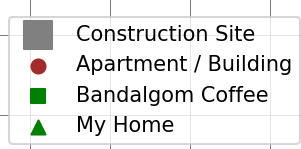
'Apartment': {'marker': 'o', 'color': 'brown', 'label': 'Apartment / Building'},
'Building': {'marker': 'o', 'color': 'brown', 'label': 'Apartment / Building'},
'BandalgomCoffee': {'marker': 's', 'color': 'green', 'label': 'Bandalgom Coffee'},
'MyHome': {'marker': '^', 'color': 'green', 'label': 'My Home'},
'ConstructionSite': {'marker': 's', 'color': 'gray', 'label': 'Construction Site'}
}
# 지도 시각화 (10인치 x 10인치 그림객체 생성)
plt.figure(figsize = (10, 10))
# gca()로 현재의 Axes를, gcf()로 현재의 Figure 객체를 구할 수 있다.
ax = plt.gca()
# 그리드 설정
max_x = merged['x'].max() #x컬럼의 최대값
max_y = merged['y'].max() #y컬럼의 최대값
ax.set_xticks([x + 0.5 for x in range(max_x + 1)]) #x축 눈금 설정 (0.5부터 잘못됨)
ax.set_yticks([y + 0.5 for y in range(max_y + 1)]) #y축 눈금 설정 (0.5부터 잘못됨)
#그리드 생성
ax.grid(which = 'major', color = 'gray', linestyle = '-', linewidth = 0.5)
ax.set_xticks(range(1, max_x + 1)) #x축 눈금 설정 (덮어그린다)
ax.set_yticks(range(1, max_y + 1)) #y축 눈금 설정 (덮어그린다)
# 보통 xticklabels는 문자를 표시하는데 숫자를 입력해서 똑같음 xticks의 갯수와 동일요
ax.set_xticklabels(range(1, max_x + 1)) #x축 눈금이름 (없어도 됨)
ax.set_yticklabels(range(1, max_y + 1)) #y축 눈금이름 ( 없어도 됨 )
ax.xaxis.tick_top() #x축틱을 탑에 표시
ax.xaxis.set_label_position('top') #x축 라벨을 탑에 표시
# 제목과 축 설정
plt.title('Map', pad = 20) #x축 타이틀 표시
plt.xlabel('X Coordinate') #x축 라벨 표시
plt.ylabel('Y Coordinate') #y축 라벨 표시
plt.xlim(0.5, max_x + 0.5) #x축 표시 범위
plt.ylim(max_y + 0.5, 0.5) #y축 표시 범위
plt.gca().set_aspect('equal', adjustable = 'box')
# 공사장 먼저 시각화
construction = plot_data[plot_data['ConstructionSite'] == 1]
plt.scatter(construction['x'], construction['y'],
marker = symbols['ConstructionSite']['marker'],
color = symbols['ConstructionSite']['color'],
label = symbols['ConstructionSite']['label'],
s = 2000)
# 구조물 시각화 (공사장이 아닌 셀만)
used_labels = set()
for struct_type in ['Apartment', 'Building', 'BandalgomCoffee', 'MyHome']:
data = plot_data[(plot_data['struct'] == struct_type) & (plot_data['ConstructionSite'] == 0)]
label = symbols[struct_type]['label']
# 중복 라벨 제거
if label not in used_labels:
show_label = label
used_labels.add(label)
else:
show_label = None
# 스캐터 방식으로 그래프를 그림, symbos에 정의된되로
plt.scatter(data['x'], data['y'],
marker = symbols[struct_type]['marker'],
color = symbols[struct_type]['color'],
label =show_label,
s = 500)
# 범례의 프레임 설정 : 우하에 설정에 따라 그림
plt.legend(loc = 'lower right', fontsize = 10, markerscale = 0.3, frameon = True)
# 범례 설정
handles, labels = plt.gca().get_legend_handles_labels() #현재축의 핸들과 레이블을 얻어와
by_label = dict(zip(labels, handles)) # 딕셔너리로 만들고(중복제거?)
# 심볼과 레이블 표시
plt.legend(by_label.values(), by_label.keys(), loc = 'lower right', frameon = True, fontsize = 10, markerscale = 0.3)
# 저장 및 출력
plt.tight_layout()
plt.savefig('map.png')
plt.show()
plt.legend()참조
label:My Home
handles:
[<matplotlib.collections.PathCollection object at 0x00000227B16FFA50>, <matplotlib.collections.PathCollection object at 0x00000227B3E6C090>, <matplotlib.collections.PathCollection object at 0x00000227B3E52890>, <matplotlib.collections.PathCollection object at 0x00000227B3E7E390>]
'Codyssey > AI선발팀프로젝트' 카테고리의 다른 글
| caffee_direct_save_bonus (2) | 2025.07.24 |
|---|---|
| caffee_map_direct.py (1) | 2025.07.24 |
| caffee_map 통계 (0) | 2025.07.24 |
| caffee_map 분석 (2) | 2025.07.24 |
| A* 휴리스틱 알고리즘 + JPS (0) | 2025.07.24 |